Why business process management matters for small businesses and nonprofits
Business process management (BPM) isn’t a luxury reserved for large corporations. For small businesses and nonprofits it’s the practical backbone that connects day-to-day activity to strategy. When processes work, your people can focus on mission-critical work: serving customers, delivering programs, and stewarding limited resources. When processes fail or hide variation, the organization spends time chasing exceptions, paying for duplicated effort, and losing confidence in its data.
The goal is simple: understand how work actually gets done, decide what needs to change, then design and sustain a future state that delivers measurable value. For small organizations this work must be pragmatic: prioritize the high-value processes, keep mapping efforts focused, and use lightweight tools where possible.
What you’ll take away
- Practical definitions and a common vocabulary for BPM, process mining, and process improvement.
- How to prioritize which processes to map and how deep to go.
- Where process mining fits and how it augments workshops and interviews.
- Actionable steps to define “as-is” and “to-be” processes for small organizations and nonprofits.
- A ready-to-use checklist to start a mapping effort with limited resources.
Core concepts: what BPM really is
At its heart, business process management is about answering three questions:
- What work do we do today?
- How well does it work?
- How do we change it to meet our goals?
Processes are the mechanism that connects people to customers and to the organization’s goals. Managing them means documenting, measuring, governing, and continuously improving them. BPM includes people, process, and technology—each matters, but process is the blueprint that determines how technology should be used.
Common roles in successful BPM efforts
Small organizations often try to crowdsource process work—but success needs a clear set of roles:
- Business process owner (BPO) — accountable for the end-to-end process and decisions about how it should operate.
- Subject matter experts (SMEs) — frontline workers and managers who know the day-to-day reality of the process.
- Facilitator / business analyst — someone to guide mapping sessions, ensure outputs are actionable, and translate workshop output into process documentation.
- IT or systems support — to advise when process design bumps into system capabilities or data limitations.
For small nonprofits or businesses this may be only a handful of people wearing multiple hats. That is fine—just make the roles explicit and protect time for SMEs to participate.
Key terms and definitions (practical)
Here are the essential terms you’ll use and why they matter.
- As-is (current state) — how a process operates today. Enough detail to spot bottlenecks and handoffs, but not a play-by-play of every mouse click.
- To-be (future state) — the desired version of the process after improvements, technology, or organizational changes are applied.
- Target operating model — a higher-level description of how the organization will operate: processes, organizational structure, technology, and governance combined.
- Bottleneck — any point that slows the process: understaffing, manual approvals, a single machine, or a missing data feed.
- Key performance indicators (KPIs) — the metrics that tell you whether the process is meeting its objectives (lead time, error rate, cost per transaction, customer satisfaction).
- Six Sigma — a quantitative methodology focused on reducing variation and defects (useful when quality and consistency are critical).
- Gap analysis — the catalog of differences between as-is and to-be (or between to-be and software capabilities).
- Change impact — who and what is affected by the change and how to manage those impacts.
Process mining: what it is and why small organizations should care
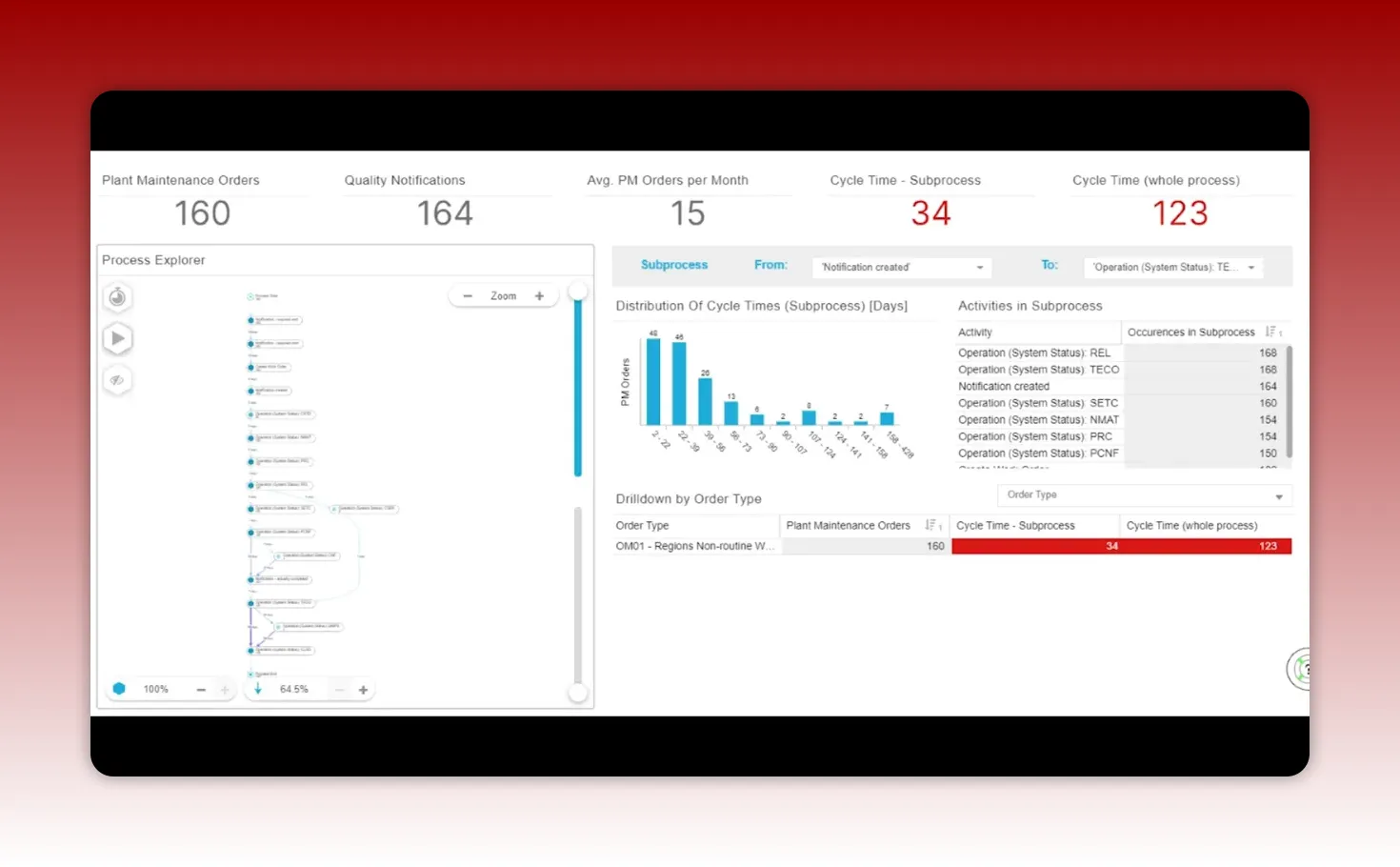
Process mining is a technology that reads event logs from your systems and visualizes how processes actually flow. Instead of relying solely on interviews and whiteboards, it reveals real patterns and variations at scale. For small operations, process mining can be remarkably useful—even if applied to a single system such as your accounting package or CRM.
Benefits for small businesses and nonprofits:
- Reveals how frequently steps or workarounds occur.
- Identifies bottlenecks and rework areas backed by data.
- Validates or challenges assumptions gathered from interviews.
- Provides factual inputs for prioritization and business cases.
A common pattern: leadership thinks a process is standardized. Mining shows dozens of variants. That insight alone creates urgency to act.
Process mining snapshot
The image below is the kind of output process mining tools produce: a visual map showing variants, loops (rework), and throughput times.
From as-is to to-be: a pragmatic approach for small teams
The natural impulse is to either over-document every click or to rush into a new system and hope it fixes problems. Neither approach works. Instead, use a pragmatic middle path:
- Map the as-is at a level that shows end-to-end flow and handoffs. Capture the parts that cause friction, exceptions, or manual intervention.
- Identify high-value problems to fix first. Prioritize by frequency, cost, and mission impact.
- Design to-be processes that are technology-agnostic. Define business rules, roles, and desired outcomes before picking specific configurations.
- Use lightweight validation and pilot tests. Don’t wait until full rollout—pilot a team, measure, then iterate.
Avoid level-5 mapping (every button click) until you have selected your software or are in design. Up-front focus should be at levels 0–2: end-to-end and sub-process clarity.
Target operating model: more than process diagrams
A target operating model (TOM) is a short description of how your organization delivers value: processes, people, governance, locations, and supporting technology. For small organizations, the TOM is a lean document: a few pages with clear choices about centralization, data ownership, and which processes are mission-critical versus commodity.
Make the TOM actionable:
- Define mission-critical processes and the ones you will standardize.
- Identify which functions are candidates for shared services or outsourcing.
- Specify the minimum technology capabilities required (reporting, approvals, audit trails).
- Document governance and decision rights—who approves changes and who measures outcomes.
Top process improvements that deliver the most value
Small organizations should be ruthless about value. Here are the improvements that tend to deliver the biggest returns.
1. Automate repetitive manual tasks
Replace spreadsheets, manual approvals, and repetitive entry with simple automation. For example, an accounts payable workflow that uses OCR and rules to auto-approve low-risk invoices can free a lot of staff time.
2. Centralized visibility and dashboards
Give people one place to see current status. A simple dashboard for program delivery, donations, or orders reduces "Where is it?" inquiries and speeds decision making.
3. Faster and cleaner financial consolidation
Better process discipline and data flow reduce close time and lower risk. Even a small charity benefits from more accurate reporting to funders and boards.
4. Shared services for repetitive functions
If you have duplicate admin tasks across programs or sites, consolidation saves costs and improves consistency. Small organizations can centralize payroll, procurement, or IT help desks without losing program agility.
5. Predictive planning and demand forecasting
Using better data and simple forecasting tools improves procurement and avoids stockouts or surplus inventory—critical for organizations that deliver physical goods or need reliable staffing forecasts.
6. Master data and data governance
Clean, governed data is the fuel for automation, reporting, and trust. Invest early in how you name donors, products, or client records to avoid headaches later.
Which processes to document first
You can’t document everything at once. Prioritize by the combination of value and risk.
- High priority (document early and in detail): Customer intake/order entry, configure-price-quote (for configurable products/services), core program delivery processes, and any process that encodes your competitive advantage or mission uniqueness.
- Mid priority: Pick/pack/ship (if you handle tangible goods), manufacturing / production processes, case management flows.
- Lower priority (document later, keep high level first): General ledger, basic accounts payable/receivable, standard HR processes that software handles out of the box.
The guiding rule: if a process materially affects donors, clients, or revenue, document it early and test it. Commodity back-office tasks can usually be mapped at a higher level and refined later.
How to run effective process mapping sessions on a budget
Process mapping does not require expensive consultants or weeks of workshops. Follow these practical steps:
- Invite the right mix: one accountable owner, 2–4 SMEs, and a facilitator.
- Start with the trigger and the outcome: what starts the process and what defines success.
- Map end-to-end on a single page. Capture handoffs and decisions; mark pain points as you go.
- Use simple tools: whiteboard, Visio, or free diagramming apps. Record actions and owners.
- Validate with the team within 48 hours and finalize the map as a living document.
If you have a willing IT partner or an ERP vendor, don’t let them drive the mapping. Use technology vendor input to test feasibility, not to define strategy.
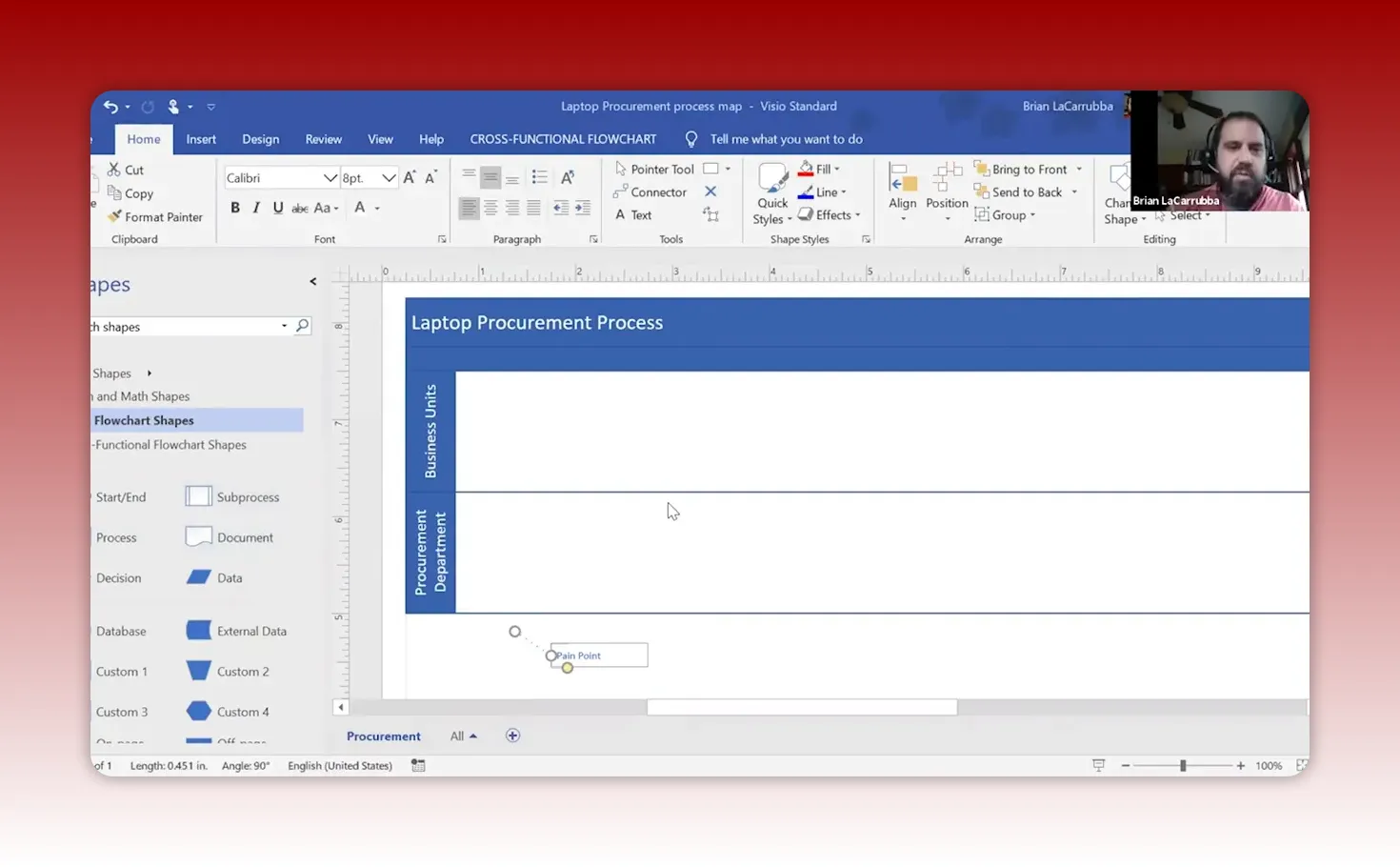
Case study: procurement for laptops (a small, practical example)
This procurement example is intentionally simple but shows how cross-functional mapping finds quick wins.
- Trigger: Need for a laptop (new hire, replacement, or broken equipment).
- Requester (SME): Department head researches specs and suppliers and fills a purchase requisition.
- Procurement (BPO): Verifies specs, checks preferred suppliers, raises a purchase order, and tracks delivery.
- Receipt: Procurement matches invoice and receipt, then notifies requester for pickup and assignment.
Typical pain points uncovered by mapping:
- No guidance on which supplier or device type to choose (Mac vs PC debate).
- No prioritization on the requisition form, so urgent requests languish.
- No visibility for the requester on procurement status.
- Invoices often arrive before receipts, causing AP confusion.
Quick wins for a small organization:
- Add a short justification field on the requisition (new hire, replacement, urgent).
- Establish a preferred supplier list and default templates for common configurations.
- Use a simple electronic form or ticketing system to track status and priorities.
- Create a small SLA for procurement turnaround on new hire requests.
Process mapping: a sample checklist for the laptop procurement flow
- Identify trigger events and final outcomes.
- List required inputs and master data fields (cost center, asset tag, device spec).
- Document decision points and approval thresholds.
- Define SLAs and KPIs: e.g., time from requisition to laptop in hand.
- Assign a process owner with authority to change the process.
- Define exceptions and their escalation path.
When to use software vendor templates and when to resist
Vendors frequently promote pre-configured, industry-specific process templates as a shortcut. They can be helpful for commodity processes. But treat those templates as a thought starter—not the final answer. For mission-critical or unique processes, preserve your business logic and only accept vendor templates that align with your target operating model.
Managing the human side: change and culture
Process change is a people problem first and a technology problem second. Consider these steps:
- Communicate the why: show how the change reduces frustration and improves outcomes.
- Involve SMEs early and give them decision roles for their processes.
- Provide training focused on exceptions and the new normal—not a laundry list of features.
- Track adoption with KPIs tied to the process owners’ goals.
Small and nonprofit organizations need to be particularly sensitive to role changes—staff often wear multiple hats, and changes will ripple. Build simple redeployment plans and cross-training to retain institutional knowledge while improving processes.
Governance and sustaining BPM long-term
For small teams, governance should be lightweight but consistent:
- Monthly process review meeting chaired by a process owner or operations lead.
- Simple KPI dashboard with 3–5 metrics per core process.
- Quarterly prioritization of improvement backlog (what to fix next).
- A change approval rule: anything impacting more than X people or Y budget must be reviewed.
Tools and tooling strategy
You don’t need enterprise-grade tools to start. Small organizations should look for:
- Low-cost process diagramming (Lucidchart, draw.io, Visio).
- Simple BPM or workflow tools that integrate with email or forms (Microsoft Power Automate, Zapier, or basic ticketing systems).
- Business intelligence for dashboards (Power BI, Tableau, or built-in reporting in your systems).
- Consider process mining tools if you have event logs and want rapid insight—some vendors have entry-level offerings or cloud-based options.
How to measure success
If you do not measure, you cannot prove value. Start with a few mission-aligned KPIs per prioritized process:
- Lead time: how long from trigger to completion?
- Error/rework rate: how often does a transaction loop back?
- Cost per transaction: time or dollars spent to complete a process.
- Customer or staff satisfaction for the process.
Use those KPIs as your north star during selection, design, and implementation.
Roadmap template for a small team
A practical 6–9 month roadmap:
- Month 1: Define digital strategy and the top 3 processes to improve. Create a simple TOM.
- Months 2–3: Map as-is for those processes and run lightweight mining/analytics if possible.
- Months 4–5: Design to-be processes, define KPIs, and select tooling for quick wins.
- Months 6–9: Pilot one or two processes; measure outcomes and scale successful changes.
Practical tips for nonprofits and volunteer-run teams
- Prioritize donor-facing and client-serving processes—these directly affect outcomes and funding.
- Use volunteers for mapping facilitation if they have consulting experience, but keep accountability with staff.
- Leverage free or nonprofit discount software tiers for BI and workflow automation.
- Document processes in ways that make volunteer onboarding faster—reduce reliance on tribal knowledge.
Common pitfalls and how to avoid them
- Pitfall: Over-mapping the current state. Fix: Limit as-is detail to what you need to prioritize improvements.
- Pitfall: Letting vendors drive process design. Fix: Own the TOM and use vendor input to test feasibility.
- Pitfall: Ignoring people change. Fix: Build simple impact plans and clear communication timelines.
- Pitfall: Measuring the wrong things. Fix: Focus KPIs on mission outcomes and cost-to-serve.
Quick-start checklist
- Pick 1–3 high-impact processes to focus on.
- Identify the process owner and 2–4 SMEs.
- Map the end-to-end as-is on one page and mark pain points.
- Define one clear to-be outcome and 2 KPIs to measure.
- Run a small pilot, measure, then iterate.
FAQ
How much time should a small organization spend mapping a single process?
A focused mapping session for a single process can be completed in 1–3 workshops of 60–90 minutes each. The first session maps the high-level flow and identifies pain points. A second session resolves decisions, exceptions, and KPIs. Follow-up validation with stakeholders should occur within 48 hours to keep momentum.
Can process mining work for a small nonprofit with limited systems?
Yes. Process mining is valuable even if applied to one system, like a donation platform or accounting system. Mining can reveal how donations or invoices are processed, where delays occur, and whether manual spreadsheets are bypassing the official system. Entry-level mining tools and cloud services have made this option practical for smaller organizations.
Do we always need to customize software to preserve our core processes?
Not always. If a process is a core differentiator, you should evaluate whether the software supports your needs or can be configured without heavy customization. Sometimes a best-of-breed add-on or a simple extension will preserve the advantage without complex customization. The key is deciding which processes are essential to preserve and designing the technology approach accordingly.
What are the first KPIs a small organization should track?
Start with 2–3 KPIs that reflect service and cost: lead time (time-to-fulfill), error or rework rate, and cost or staff hours per transaction. For nonprofits, include a beneficiary satisfaction or case turnaround metric as a mission-aligned indicator.
How do we handle resistance when processes change?
Make change manageable: explain the purpose, involve staff early, train on exceptions, and show early wins. Leaders should publicly support process owners and celebrate quick improvements. For volunteer-run parts of an organization, keep changes simple and provide concise how-to guides.
What’s a reasonable ROI expectation for a small process improvement?
ROI varies by process. Automating repetitive admin tasks often yields quick and measurable returns—hours recovered each week that can be redeployed. For customer-facing processes, ROI should factor in improved retention, faster delivery, or increased donations. Use conservative estimates and measure actual outcomes from pilots.
Next steps
Start small and be disciplined. Identify one process that causes the most pain or costs the most staff time. Map it, measure it, and test an improvement that you can evaluate in 8–12 weeks. Keep the work cross-functional and outcome-focused. Over time, a few pragmatic wins compound into a resilient operating model that lets the organization focus on mission instead of firefighting.
If you want to go deeper, consider creating a short resource pack for your team: a one-page TOM, a prioritized process list, and a template for mapping sessions. Those three items alone will focus your next three months of improvement work.
This article was created based on the video Introduction to Business Process Management: The Complete Training Course.


